레이블이 r인 게시물을 표시합니다. 모든 게시물 표시

2016년 3월 6일 일요일

R Programming (12) - BLI(Better Life Index) Analysis (wsyang.com 참조)

1.’ggplot2’ library 불러오기, ‘Better Life Index of 2015 Years’ 자료 읽어오기

cf) 자료: http://stats.oecd.org/Index.aspx?DataSetCode=BLI

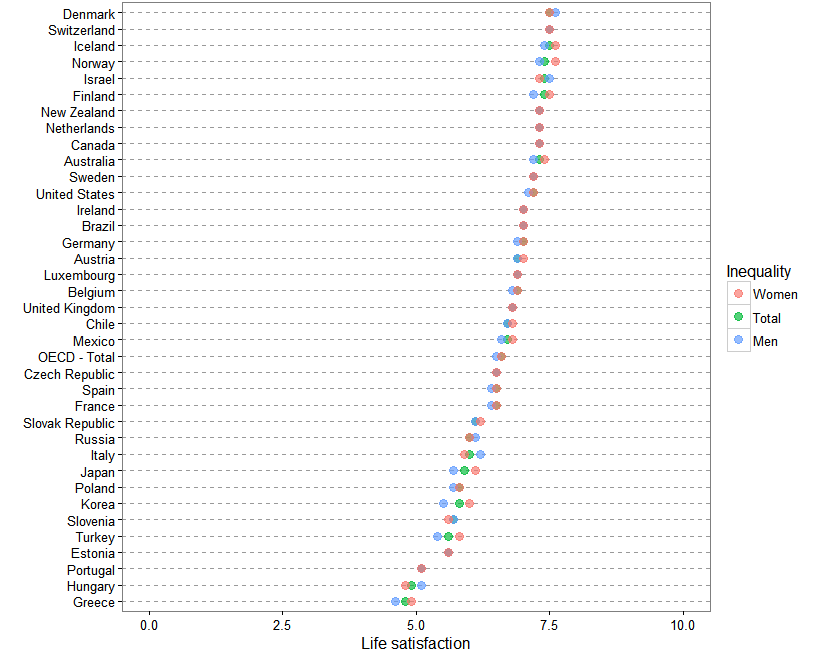
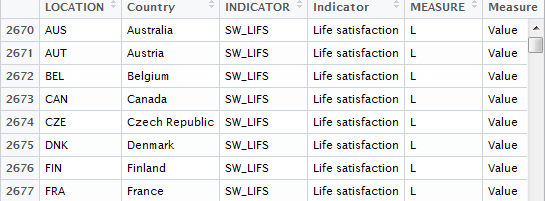
2. 삶의 만족도 소득 상하위 10%, 전체 점수 추출

cf) wealth variable
3. 소득 차이에 다른 삶의 만족도

4. 소득 상위 10%와 하위 10%의 만족도 차이
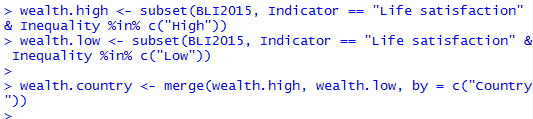
<output - red: Korea, green: OECD total average>
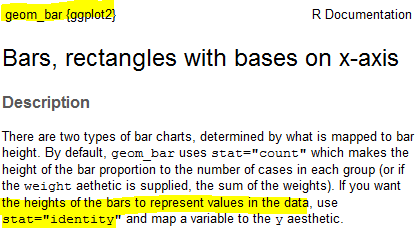
cf) geom_bar(stat = “identity”,....)
5.삶의 만족도 남녀 차이

6. 코드
library(ggplot2)

BLI2015 <- read.csv("./R_data/BLI_2015.csv", stringsAsFactors = FALSE)

wealth <- subset(BLI2015, Indicator == "Life satisfaction" &
                  Inequality %in% c("Total", "High", "Low"))
wealth$Inequality <- factor(wealth$Inequality, levels = c("High", "Total", "Low"))

ggplot(wealth, aes(x=Value, y=reorder(Country, Value), colour = Inequality)) +
 geom_point(size=2, alpha = 2/3) +
 theme_bw() +
 theme(panel.grid.major.x = element_blank(),
      panel.grid.minor.x = element_blank(),
      panel.grid.major.y = element_line(colour = "grey60", linetype="dashed")) +
 
 ylab("") +
 xlab("Life satisfaction") +
 xlim(0,10)

wealth.high <- subset(BLI2015, Indicator == "Life satisfaction" & Inequality %in% c("High"))
wealth.low <- subset(BLI2015, Indicator == "Life satisfaction" & Inequality %in% c("Low"))

wealth.country <- merge(wealth.high, wealth.low, by = c("Country"))
wealth.country <- wealth.country[c("Country","Value.x","Value.y")]
names(wealth.country) <- c("Country", "High", "Low")
wealth.country$diff <- with(wealth.country, High - Low)
wealth.country <- wealth.country[order(wealth.country$diff),]

wealth.country$color <- "1"
wealth.country[wealth.country$Country == "Korea","color"] <- "2"
wealth.country[wealth.country$Country == "OECD - Total","color"] <- "3"

write.csv(file="Life_wealth.csv", wealth.country,row.names = F)

ggplot(wealth.country, aes(x=1:31, y=diff, fill=color)) +
 geom_bar(stat="identity", position="identity", colour="black", size=0.25) +
 xlab("") + ylab("difference of Life satisfaction") +
 scale_fill_manual(values = c('#474749','#CC1862','#8CF226'), guide=FALSE) +
 theme_bw() +
 theme(axis.ticks = element_blank(), axis.ticks = element_blank())
 
 
  • 본 게시물은 wsyang.com 의 포스트를 참고하였습니다. 한 두가지 오류 수정 및 실제로 코딩함으로써 과정에 대한 이해하는데 목적으로 했습니다. 본 글은 저의 이해를 바탕으로 대충(?) 쓰여졌으므로 wsyang.com에 가시면 더 좋은 원본 자료를 보실 수 있습니다.

2016년 3월 3일 목요일

R Programming (11) - 태풍 이동 경로 시각화 (wsyang.com 참조)

1.library 불러오기

2. 데이터 불러오기(약간의 시간이 걸린다. 안된다고 오해 금지)

cf. 데이터 내용


3. dplyr 패키지를 이용하기 위해 tbl_df로 변환


4.Season, Latitude, Logitude : 문자 -> 숫자,
Wind.WMO. : 문자 -> 숫자 & 노트 -> 초속(m/s),
ISO_time에서 월 정보 추출
cf)POSIXct vs. POSIXlt

5. 지도에 태풍 경로를 위한 태풍 ID 생성(2014-2016)

6. 연도 별로 태풍 경로 시각화

7. 결과물

Appendix - Organized Code

library(ggmap)
library(ggplot2)
library(dplyr)

noaa <- "ftp://eclipse.ncdc.noaa.gov/pub/ibtracs/v03r05/wmo/csv/basin/"
WP.basin = read.csv(paste(noaa, "Basin.WP.ibtracs_wmo.v03r05.csv", sep = ""), skip = 1, stringsAsFactors = FALSE)

WP.basin <- WP.basin[-1,]

WP.df <- mutate(WP.basin.df,
               Season = as.numeric(Season),
               Latitude = as.numeric(gsub("^ ", "", Latitude)),
               Longitude = as.numeric(gsub("^ ", "", Longitude)),
               Wind.WMO. = as.numeric(gsub("^ ", "", Wind.WMO.)) * 0.5144,
               ISO_time = as.POSIXct(ISO_time, format = "%Y-%m-%d %H:%M:%S"),
               Month = factor(substr(ISO_time,6,7), labels = c(month.name))
               )

substorms <-filter(WP.df,Season %in% 2000:2010 & !(Name == "NOT NAMED"))
substorm <- mutate(substorms, ID = as.factor(paste(Name, Season, sep = ".")))

map <- ggmap(get_googlemap(center = c(lon=145, lat=40),
                         zoom=3, maptype = "terrain",
                         color="bw", scale = 2), extent = "device")

map + geom_path(data = substorm, aes(x = Longitude, y = Latitude, group = ID, colour = Wind.WMO.), alpha = 0.5, size = 0.8) +
     labs(x="", y="", colour = "Wind \n(m/sec)", title = "Typhoon Trajectories 2014-2016") +
     facet_wrap(~Season) +
     theme(panel.background = element_rect(fill = "gray10", colour = "gray30"),
           axis.text.x = element_blank(),
           axis.text.x = element_blank(),
           axis.ticks = element_blank(),
           panel.grid.major = element_blank(),
           panel.grid.minor = element_blank())


  • 본 게시물은 wsyang.com 에서 ‘태풍 이동 경로 시각화’ 포스트를 참고하였습니다. 한 두가지 오류 수정 및 실제로 코딩함으로써 과정에 대한 이해하는데 목적으로 했습니다. 본 글은 저의 이해를 바탕으로 대충(?) 쓰여졌으므로 wsyang.com에 가시면 더 좋은 원본 자료를 보실 수 있습니다.

2016년 2월 12일 금요일